
The LEAP (Local Educational Agency Program) file in CALPADS captures student participation in state-funded Expanded Learning Programs (such as ELO-P, ASES, ASSETS, and 21st CCLC). It is submitted annually at the LEA level rather than by individual school site, covering the full academic fiscal year (July 1 – June 30).
Who is required to submit the LEAP file?
All LEAs that receive ELO-P funding have a CCLC (including ASSETS) grant, and/or ASES grant are required to submit LEAP records. Missing this file will result in a fatal Certification Validation Rule (CVR) error.
The LEAP file will include all ELP (Eligibility & Participation counts)
from July 1st, 2025, to June 30th, 2026.
For CALPADS purposes, counts can come from the following Expanded Learning Programs (ELPs):
- Expanded Learning Opportunities Program (ELO-P)
- 21st Century Community Learning Centers (21st CCLC), which includes programs serving elementary and middle/junior high school students, and the After School Safety and Enrichment for Teens (ASSETS) program
- The After School Education and Safety (ASES) program
*Attendance Recovery (AR) *ONLY if funded by ELO-P funds!
The two data elements that CALPADS is collecting in the LEAP file:
- What students were eligible for ELP (meaning: any student whose parents/guardians have signed an expanded learning program registration form. If that form is on file, that student should be considered enrolled in the expanded learning program for this count, even if they did not attend/participate in ELP.)
- Total day count of eligible students' participation in ELP: For CALPADS reporting purposes, LEAs must track whether a student “attended” any (ELP/ELO-P, ASES, ASSETS, CCLC) on a given day, and it does not matter how long the student attended. If a student was in 2 or more eligible ELP classes on the same day, the count for that day = 1.
For questions on ELO-P, contact the Expanded Learning Division at ExpandedLearning@cde.ca.gov
Please refer to all CDE requirements as our doc is only intended to help clarify information.
https://www.cde.ca.gov/ds/sp/cl/calpadsupdflash305b.asp
How are participation days calculated?
For CALPADS: Participation is tracked in total days per student. Any amount of participation on a given day counts as one full day of attendance. Students on program rosters who did not participate on any day should be reported with zero days. One ELP day equals a student attending an ELP for any amount of time during a single day. This means one ELP day may equal five minutes, 2 hours, or attendance in both a before and after school program on the same day.
How do I set up ELP in SchoolWise?
The best way to track ELP program attendance/participation data is to have courses set up in SchoolWise for ELP as positive attendance and take attendance as it happens throughout the year. If you need help setting up the ELP 365 calendar for your LEA, please contact SchoolWise support.
https://help.schoolwise.com/docs/expanded-learning-program-tracking?highlight=leap
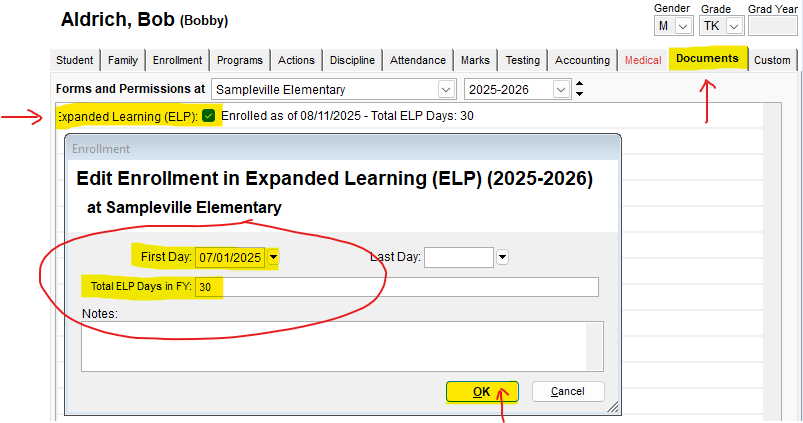
If you are not tracking/entering attendance directly into an ELO-P course in SchoolWise, the best way to add total days of participation would be in the Student Form – Documents – Expanded Learning (ELP), use the start date: July 1st, then enter ALL total days of participation from July 1st – June 30. (see below) This ONLY HAS TO BE PUT IN for students that had participation days; if a student had 0 days, you do NOT have to enter that data here; SchoolWise will assume a zero count if the student is also enrolled into the ELP class, and has NO ELP document record. But, if you are not using an ELP class roster to determine "enrolled participants," then you can add students (that were eligible but did not participate) here with a zero for total days.
Where do I find the LEAP Extract in SchoolWise?
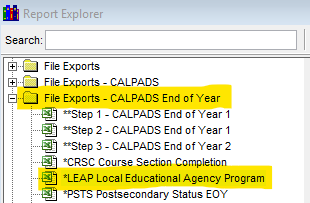
Open the Report Explorer, and you will find the extract under the Files Exports - CALPADS End of Year folder:
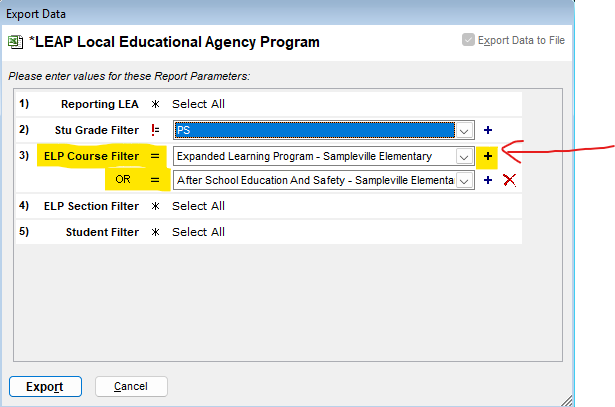
When running the report in SchoolWise, it is best to choose which courses you wish to be included in the ELO-P participation counts. If you have more than one (Positive attendance, Period 9) course that qualifies for ELO-P, then click on the + sign to add each course that you want to use for the LEAP participation totals:
Helpful reports & Tips
Attendance Totals by Student NoExc (for negative attendance classes)
LEAs that are not participating in the Expanded Learning Program will still be required to open the Certification Report 19.1 to confirm no data exists, in order to certify their EOY 1 submission.
Note that LEAs only report ELP participation for students who were enrolled at schools within in the LEA at some point during the Academic Year (July 1 – June 30). LEAs may serve students in their expanded learning programs who were never enrolled in the LEA, but they do not report them.
CALPADS Update Flash #305
https://www.cde.ca.gov/ds/sp/cl/calpadsupdflash305.asp
Please refer to the CDE requirements as our doc is only intended to help clarify information.
https://www.cde.ca.gov/ds/sp/cl/calpadsupdflash305b.asp